Choosing how your stand is built
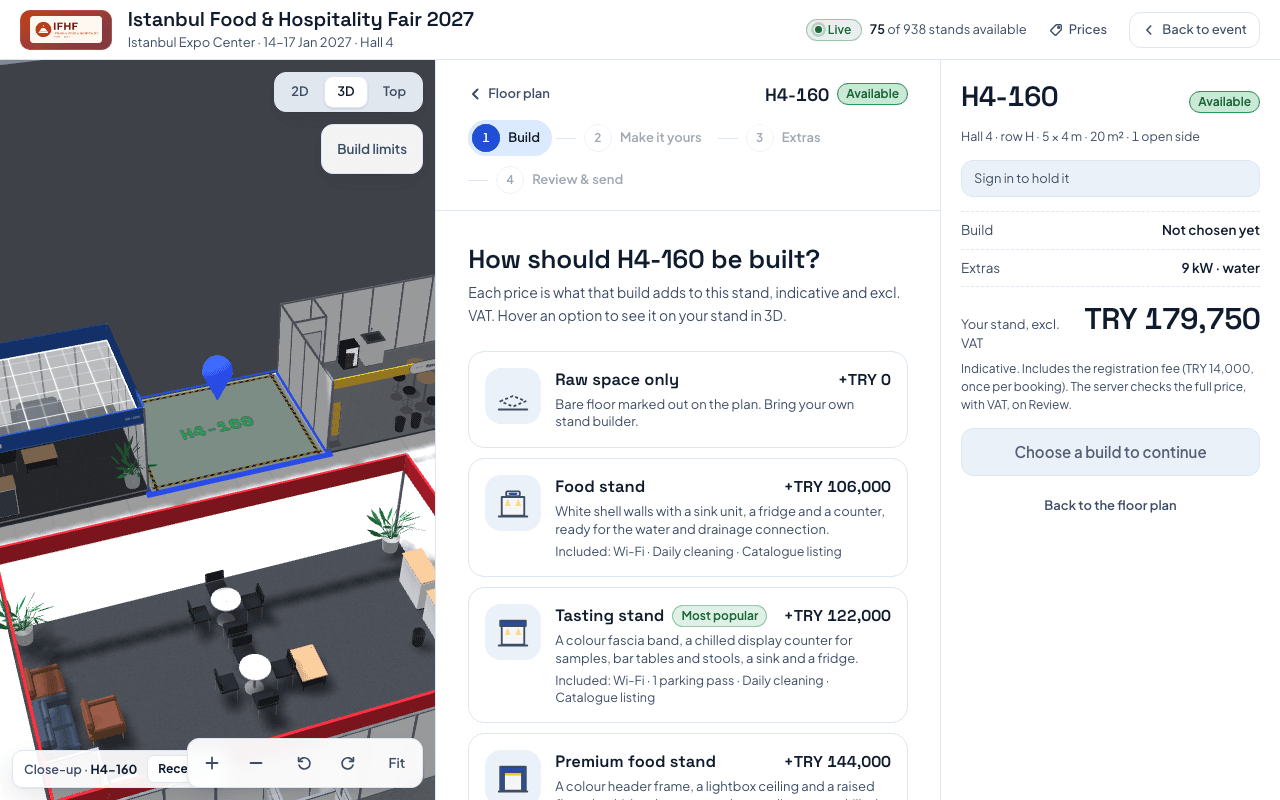
When the organizer offers more than one build, the Build step lets you pick bare space, one of the organizer's packages, or your own build.
Updated November 15, 2026
When the organizer offers a choice of builds, booking a stand starts with the Build step. It asks How should your stand be built?
The options you may see:
- Raw space only: bare floor marked out on the plan. You bring your own stand builder.
- The organizer's packages, each under its own name: ready stands set up by the organizer, with what is included.
- Build your own: choose walls, fascia, lighting and carpet piece by piece, each priced for this stand.
Which options appear depends on the event. Each price is what that build adds to this stand. It is indicative and excludes VAT. Hover an option to see it on your stand in 3D.
Builds that don't fit the stand are not offered. The page says how many, for example "2 other builds don't fit [stand code], so they aren't offered here".
After you pick, the next steps depend on your choice:
- A package or Build your own gets a page to customise it: Make it yours, or Structure for Build your own.
- Raw space has no customise page.
- Extras (or Furniture for Build your own) appears only if the organizer rents furniture or offers services.
- Every booking ends with Review & send.
The later steps stay locked until you choose a build. They say Choose how the stand is built first.
Was this helpful?