Finding your invoices and receipts
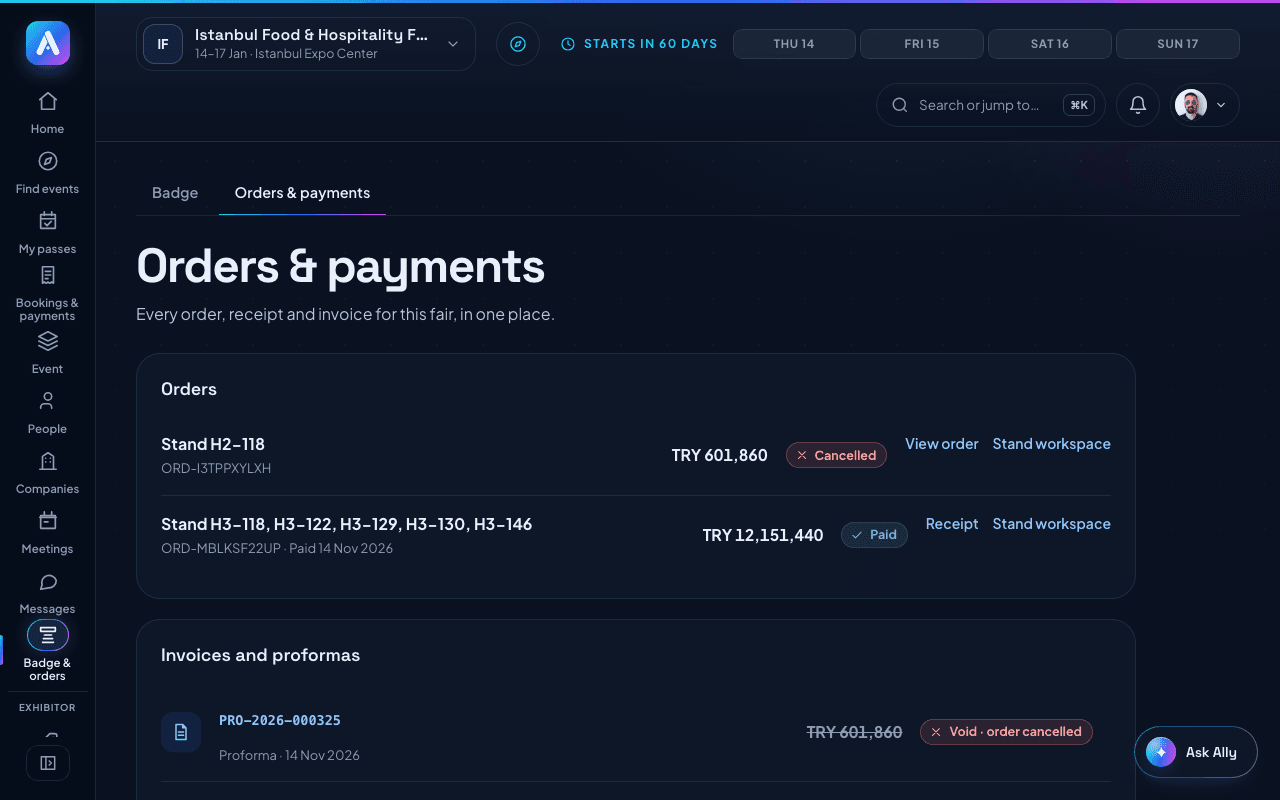
Orders & payments lists every order, receipt, proforma and invoice for the fair you are working in.
Updated November 14, 2026
Orders & payments has every order, receipt and invoice for the fair you are working in: passes, pass upgrades, stands and sponsorships.
To open it:
- Open Badge & orders in the menu.
- Choose the Orders & payments tab.
What you find there:
- Orders: each order with its status: Paid, To pay, Refunded, Cancelled or Expired.
- Invoices and proformas: each document, marked Proforma, Invoice or Credit note. Open one to see and print it.
To see a receipt:
- On a paid order, press Receipt. On an unpaid one, press View order.
- Press Print or save as PDF to keep a copy.
Good to know:
- A stand you asked for shows its steps: Request sent, Organizer review, Contract and proforma, Payment, Confirmed. There is no invoice before the organizer approves. The proforma comes with the approval.
- Invoices are issued by the organizer. VAT is shown on its own line.
- A document marked Void · order cancelled belongs to a cancelled order.
- Stand invoices are also on the Stand page, under Invoices. Only company admins can see them.
- To see another fair's orders, switch to that event first.
Was this helpful?